The Simple Weather widget is a small and simple (duh!) widget for wordpress which enables the display of weather forecast with icons for any location as specified by the post custom field. The widget adapts to the look and feel of the blog theme. A typical Simple Weather widget can look like this (example from this site):
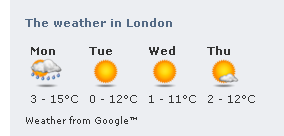
Installation
- Download the zip via the download button below.
- Extract and upload to your wordpress installation plugin folder.
- Activate the widget plugin via the admin panel of your blog.
- In the admin panel widgets section, drag the Simple Weather widget to the desired position in the sidebar.
- Select temperature unit, Celcius or Farenheit.
- Done!
Usage
To use the widget, in the desired posts simply add a cityName and possibly weatherBase custom fields with the name of the city for which you wish to display the weather. The weatherBase is only needed if Google weather API does not recognize the city in cityName.
If neither cityNamenor weatherBase is entered, the widget will not display.
Download
Popularity: 12% [?]
Hi Jesper,
I can’t download your plugin. Can you help me to sent via emai?
Many thanks,
Lex
Yeah… um… join a game site for your widget? Pass O_o Too bad… looked like a good one.
Does anyone know where to get a text only weather widget?
Hi. I would really like to try your plug in but the survey refused my post code
Sorry – I type ood the email address!
Hi. I would really like to try your plug in but the survey refused my post code.
I just can’t download it .. Is it working with WP 3.01.
Yes it should be working with wp 3+
Hi Jesper, I tried to download the zip file, but I couldn’t because there is no survey so the download is disabled …
I really would like to try your plugin …
thnx
Hi Jesper
This looks really interesting and I’d like to try it but downloading it is proving difficult. It didn’t work in Safari or FF. And on Chrome I got diverted to a survey site. Is there a more straight forward way to download it without giving away personal information? Will you be submitting it to the official WordPress site?
Many thanks
Neil
Mail sent.